
Stem-based DJ mixing · for Windows
Separate.
Layer.
Mix.
CutSet splits every track into drums, bass, vocals and melody, finds the phrase where two songs fit best, and hands each stem over on its own. Load a playlist; get one continuous, non‑stop mix.
Try it · drag the cue
Track A playing
How it works
From playlist to a finished set in four moves.
-
01
Separate
Every track splits into drums, bass, vocals and melody. A quick split makes it mixable in seconds; a full-quality separation replaces it on your graphics card in the background.
-
02
Analyse
Tempo, key, beat grid, 8/16/32-bar phrases, energy and exactly where the vocals sing. Nothing to mark by hand.
-
03
Choreograph
CutSet scores every phrase-aligned cue pair on energy, groove, frequency clearance, vocal collisions and key, then plans each stem's handover. Bass first, drums last.
-
04
Mix
Hear any transition as you shape it, tweak what you like, then render the whole set to one loudness-matched file.
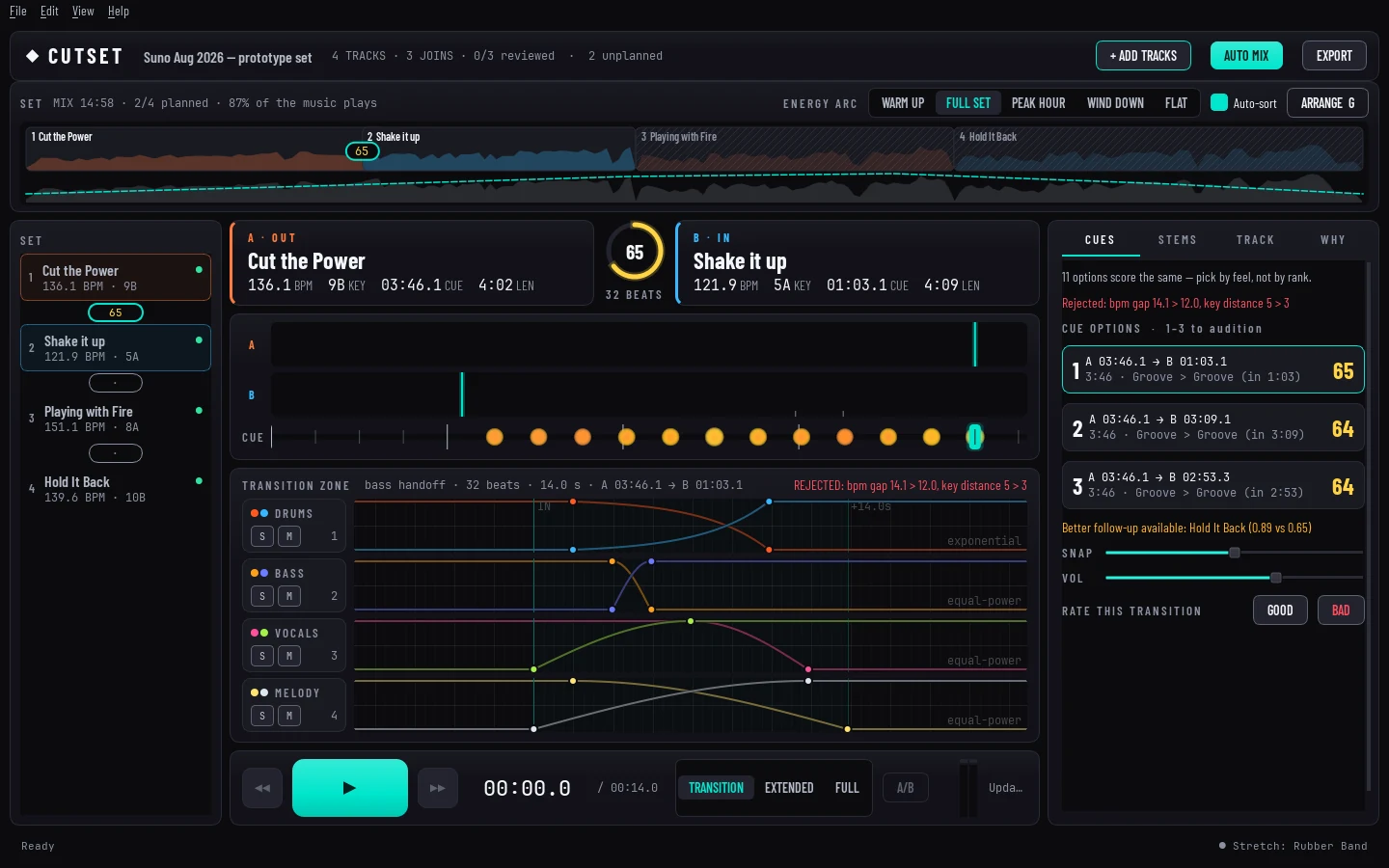
The transition editor
Every handover, in one view.
The AI proposes; you decide. Every cue, curve and swap point it picks can be dragged, nudged or redrawn, and you hear the change while you make it.
Stem compatibility
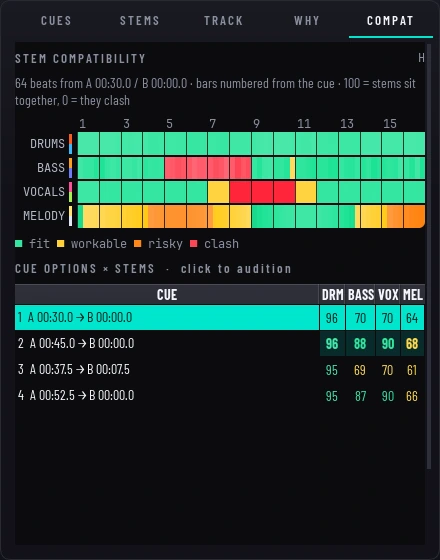
See the clash before you hear it.
The compatibility heatmap shows, bar by bar, where each stem pair sits together and where two basslines or two vocals would fight. Each cue option gets a score per stem, so you can pick by ear and by evidence.
- fit
- workable
- risky
- clash
Features
Built like hardware. Thinks like a headliner.
Magnetic cue slider
The cue snaps to scored phrase boundaries, and better transitions pull harder. Arrow keys hop between them.
No vocal pile-ups
Two vocals never sing over each other. CutSet shifts, ducks or mutes the outgoing voice for you.
Genre recipes
Built-in stem orders for house, techno, hard techno, trance, minimal and drum & bass, plus recipes of your own.
Locked to the beat
A beat-matched warp map, refined on the drum stems, keeps kicks aligned through the whole blend.
Loops and stem FX
Phrase-snapped stem loops with optional decay, plus filter sweeps, reverb, delay and stutter per stem.
Live preview
Solo or mute any stem mid-playback, flip A/B against your last version, and scrub straight on the waveform.
Make my mix
One shortcut turns a whole playlist into a finished set with an energy arc, from warm-up to wind-down.
Keyboard first
Space, arrows, 1–4 to solo, Shift+1–4 to mute, Ctrl+K for every command. The mouse is optional.
Coming soon
CutSet for Windows is on its way.
CutSet is in private testing. The public version will turn your own music into continuous DJ mixes, entirely on your PC.
Coming soonWhat you will need
- System
- Windows 10 or 11, 64‑bit
- Graphics
- NVIDIA graphics card recommended for full-quality stems; mixing works without one
- Music
- Your own files: MP3, WAV, FLAC, AIFF, M4A, AAC or OGG